Wuuk
- 3.8
- Rating
- 100.00K
- Installs
- Free
- Price

 Analysis by App-foxy
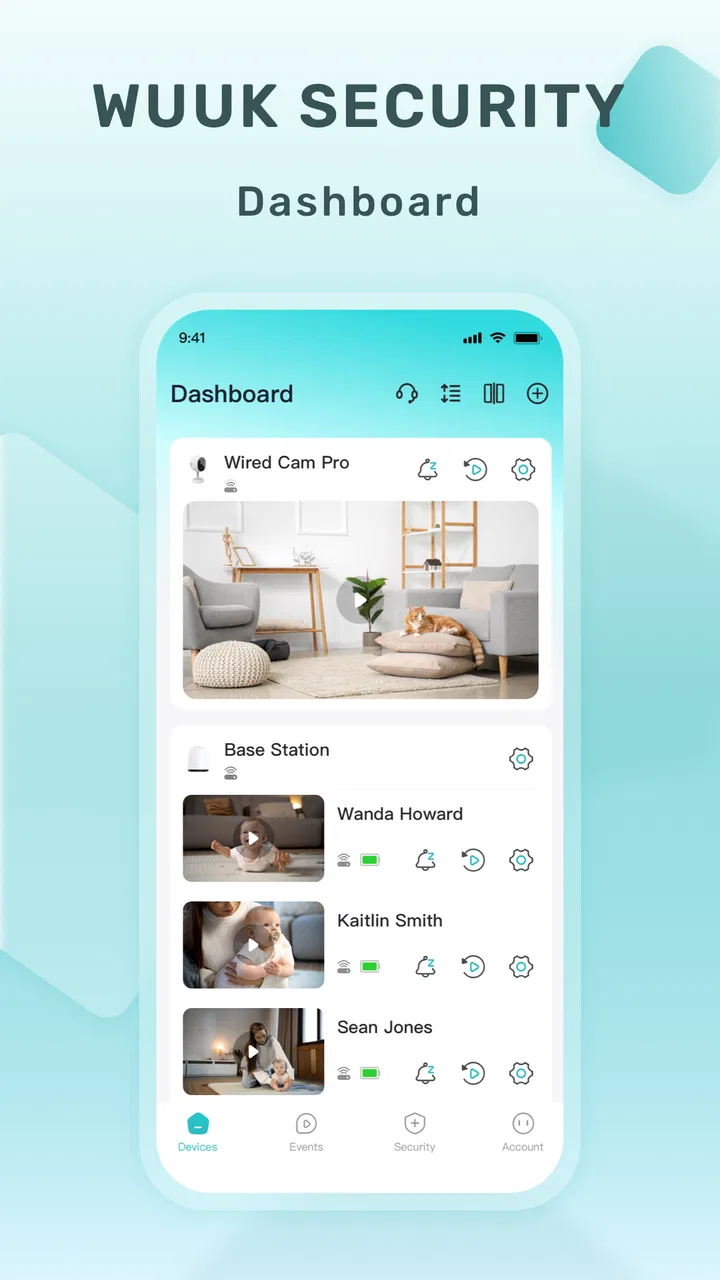
I approached Wuuk as the kind of app you open because a physical device at home needs attention, not because you want to browse another social feed. Developed by Wuuk Labs, this free House & Home app acts as the control point for Wuuk devices. That purpose is both its biggest strength and its main limitation: when your household uses compatible hardware, one place for access and control makes sense; without that hardware, there is little reason to keep it installed.
My overall impression is practical rather than exciting. The app is built around a clear starting condition: you have a Wuuk device, you need to reach it from your phone, and you want the phone to become the handoff between your intention and the device’s response. It is available to everyone in terms of content rating, supports Android from version 5.1 onward, and is currently listed as version 4.2.5. Those details make it approachable for people using older phones, although the experience still depends more on the particular Wuuk product and the quality of the connection than on the app alone.
From opening the app to getting a household task done
I find it useful to judge a home-control app by the whole journey, not just by whether its first screen opens: can I identify the right device, make a deliberate change, and understand what happened? That practical test also helps separate a brief delay from a genuine reliability concern. Next, I look at how the experience holds up when household use becomes less predictable.
You May Also Like

 Blood Strike: 2.5 Anniversary
Blood Strike’s Loadouts Turn Every Drop Into a Tactical Gamble
A close look at Blood Strike’s custom loadouts: how fast access to signature weapons reshapes its battle royale rhythm, rewards preparation, and narrows the gap between fights.

 Pandora - Music & Podcasts
Pandora’s Music Is Easy to Start, but Harder to Recover
Pandora’s strength is its low-effort path from a seed to a station. Its weak spot is how much confidence it asks you to place in connection, setup, and quiet recovery.

 8 Ball Pool
 Is Built on Rivalries, Rematches, and Routine
A close look at the rivalries, rematches, shared routines, and unanswered safety questions that turn a quick pool match into a persistent mobile community.

 Samsung Music
’s Quiet Strength Is Playing What You Already Own
Its reach comes less from spectacle than from dependable access to a personal library. That simplicity is both the app’s strongest retention engine and its ceiling.

 AccuWeather: Weather Radar
AccuWeather Review: A Quick, Clear Forecast for Everyday Decisions
For everyday plans, the best forecast is the one you can understand quickly. AccuWeather makes rain timing, radar, and local conditions easy to act on, with a few trade-offs.

 Hill Climb Racing
Why Hill Climb Racing Still Turns Crashes Into One More Run
A tiny car, a bumpy hill and one more upgrade: Hill Climb Racing keeps resurfacing because its simple chaos makes every near-miss feel personal.
More From Our News Desk



The starting condition: a device that needs a reliable control point
The most useful way to understand this app is to imagine an ordinary moment at home. You are standing outside, moving through your routine, or dealing with a device that you do not want to operate manually. Your first question is not “What can this app do?” but “Can it give me dependable access to the Wuuk hardware I own?” The app is designed around that question.
That focus is welcome. Many household-device apps try to become dashboards for lights, cameras, sensors, locks, routines, accounts, and unrelated recommendations all at once. Wuuk’s purpose is narrower: it is the hub for accessing and controlling Wuuk devices. In my experience, a focused hub is easier to understand than a crowded smart-home platform, especially when you only need to complete one task quickly.
The trade-off is equally clear. This is not a general home-control app that becomes useful simply because you have a phone. Its value is tied to the Wuuk ecosystem. If your home is built around another manufacturer, or if you want one app to combine equipment from several brands, a broader platform may be a better fit. Installing this one just to explore it is unlikely to provide much value without compatible hardware ready to connect.
The first step: setting up the relationship between phone and device
The initial setup is best treated as a handoff rather than a single tap. The phone provides the interface, the app identifies the relevant Wuuk equipment, and the physical device remains the thing that actually performs the requested action. I recommend doing this setup while you are near the device, with enough time to confirm that the app and hardware recognize each other before relying on the arrangement in a rushed situation.
This matters because a control app can look perfectly fine while the real problem is elsewhere. A phone may have a weak connection, the device may be unavailable, or the account and hardware may not be aligned. When testing Wuuk, I would not stop after seeing a device appear on screen. I would perform the specific action I expect to use most often, then check the physical result. That simple verification prevents an unpleasant surprise later.
There is also a useful distinction between access and control. Seeing a device in the app is only the beginning; the practical test is whether the app lets you reach the control you need without unnecessary searching. For a household tool, the best interface is the one that disappears into the routine. If I have to remember a complicated path every time, the app becomes an extra chore instead of removing one.
Moving through the control flow
Once the device is available, the normal flow is straightforward in concept: open the hub, choose the relevant Wuuk product, select the required control, and confirm the outcome on the hardware. I like this model because it keeps responsibility visible. The app is not pretending to replace the device; it is the bridge between the user and the device.
For daily use, I would organize my habits around the actions that matter most. If I use the app for a single repeated task, I would learn where that control lives and avoid wandering through every screen. If several Wuuk devices are present, I would slow down before confirming an action and make sure the selected device is the intended one. A hub is convenient precisely because it gathers equipment together, but that convenience can create mistakes when similar device names or icons are easy to confuse.
One non-obvious advantage of this workflow is that it encourages a quick pre-check. Before leaving home, I can use the app as a reminder to verify the state of a Wuuk device rather than relying on memory. The value is not just remote access; it is reducing uncertainty. That is especially helpful when the alternative is turning around to check something physically.
At the same time, I would avoid treating the app as a substitute for a physical backup plan in situations where failure would be serious. A phone-based control path introduces another dependency: the phone must be available, the app must work, and the device must respond. For routine convenience this is reasonable. For an urgent household need, I would still think about what I would do if the digital handoff failed.
The handoffs that determine whether the experience feels smooth
The most important handoff happens between the app and the device. A command is only useful when the physical product responds in a way I can understand. If the result is immediate and obvious, the app feels dependable. If I have to repeat an action or guess whether it worked, confidence drops quickly.
A second handoff occurs between the person using the phone and another person in the household. One person may set up the device, while another uses the app later. That makes naming and organization more important than they first appear. I would use clear, distinctive labels for devices and explain the basic control path to anyone else who may need it. A hub works best when it supports shared household understanding rather than remaining a private tool known only to the installer.
The third handoff is between the app and the next action in real life. For example, a user may check a device before leaving, make a change, and then continue with the day. The app should not require a long confirmation ritual for a simple task. My practical advice is to test the full sequence at a calm time: open the app, locate the device, make the change, observe the physical result, and close the app. That reveals friction that a quick setup screen will not show.
This is also where the app’s ecosystem focus becomes a strength. Keeping Wuuk equipment in a dedicated hub can be less confusing than splitting attention across several unrelated manufacturer apps. On the other hand, if your household already has many brands, adding another dedicated hub may increase rather than reduce the number of places you need to check. In that situation, a platform with wider compatibility could offer a cleaner overall workflow, even if its individual device controls are less focused.
The result: convenience when the final action is clear
When the connection is working, the result is simple and useful: a phone becomes a practical doorway to Wuuk hardware. I do not need to think about the app as a separate destination. I open it for a purpose, carry out the control, and return to whatever I was doing. That is the right shape for a home utility app.
The app’s audience confirms that role. It has passed 100K installs, with an average rating of 3.8 from around 742 ratings and 222 written reviews. Those figures suggest a product that is useful to a meaningful group of owners but not universally frictionless. I would read the rating as a reason to set realistic expectations, not as a reason to dismiss it. A device companion app can be judged harshly when connection or hardware issues interrupt the task, even if the interface itself is adequate.
The free download also lowers the barrier to trying the hub with compatible equipment. However, in-app purchases range from $3.99 to $294.99 per item, so I would pay attention to any purchase screen and make sure I understand what is being offered before confirming it. The presence of optional purchases does not automatically make the app unsuitable, but it does mean that “free” should be understood as the cost of downloading the app, not as a promise that every possible device-related function has no charge.
For a realistic everyday scenario, imagine leaving for work and wondering whether a Wuuk device was handled as intended. Instead of making the trip back, I would open the hub, select the device, perform the relevant check or control, and wait for a clear result. If the response is confirmed, the app has saved time and removed doubt. If the response is ambiguous, I would not keep tapping blindly; I would check the physical situation when possible and treat the app as an aid rather than absolute proof.
Where the flow breaks and how I would respond
The first break is the most obvious one: no compatible Wuuk hardware means no meaningful workflow. This app is not a replacement for a general home organizer, a shopping list, or a universal remote. Someone looking for broad household automation should compare it with a platform designed to bring different brands together.
The second break is a confusing device handoff. If the app shows multiple products and their names are too similar, a rushed user can choose the wrong one. I would prevent that by giving each device a precise identity during setup and checking the displayed name before every important action. This is a small habit, but it matters more than decorative interface details.
The third break is uncertainty after a command. A control app needs a trustworthy way to communicate whether the requested change reached the hardware. If the physical response is delayed, I would wait rather than repeatedly issue the same command. Repeating commands can make it harder to tell which action succeeded and may create an outcome different from the one intended.
The fourth break is dependence on one phone and one account path. In a shared home, I would decide in advance who needs access and make sure the people responsible for the device know the basic route through the app. If only one person understands the setup, the household has a single point of failure. That is not a reason to reject Wuuk, but it is a reason to treat setup as a household process rather than a private technical task.
Older Android support is a practical plus, since the minimum operating system is Android 5.1. Still, compatibility on paper does not guarantee an equally comfortable experience on every older handset. I would judge the app on the phone that will actually be used every day, not only on the newest device available during installation.
Who should use it, and who should choose something else
I would recommend Wuuk to someone who already owns Wuuk equipment and wants a dedicated place to access it from a phone. It is also a sensible choice for households that prefer a focused manufacturer hub over a larger smart-home system with many unrelated controls. People who value a simple input-to-outcome routine will probably appreciate the app most: open it, find the device, issue the action, and confirm what happened.
I would be more cautious for users building a mixed-brand home. A universal platform may require more initial organization, but it can reduce the need to jump between manufacturer apps. I would also hesitate to recommend Wuuk to anyone who expects the app itself to provide a complete household-management experience. Its purpose is device access and control, not a broad collection of lifestyle tools.
Another group that should think carefully is anyone who needs guaranteed operation in high-pressure circumstances. A phone hub is convenient, but convenience and resilience are not the same thing. I would test the app repeatedly in the exact environment where it will be used, keep device naming clear, and understand the physical fallback before depending on it.
My final view after following the complete workflow
Wuuk makes sense when the starting condition, handoff, and result all involve Wuuk hardware. Its strongest quality is focus: it gives owners a central route into their devices without asking them to learn a much larger smart-home system. I also like that the app can turn a vague worry into a quick check, which is a small but genuinely useful benefit in everyday life.
My reservations are equally practical. The experience is only as dependable as the connection between phone, app, account, and physical device. Shared households need clear organization, and buyers should treat in-app purchase prompts carefully. The moderate average rating reflects why expectations should stay grounded: this is a useful companion, not magic that removes every hardware or connectivity problem.
For me, the deciding question is simple: do you already rely on Wuuk devices, and will phone-based access make a recurring task easier? If the answer is yes, the free app is worth trying and testing through a complete real-life workflow before you depend on it. If the answer is no, I would skip it and look for a broader home-control option that matches the equipment already in your house.
FAQs for Wuuk
01What is Wuuk, and what can I use it for?
Wuuk is a social and entertainment app designed to help users discover content, interact with other people, and participate in an online community from a mobile device. Depending on the version and region, available features may include profiles, messaging, content sharing, live or interactive activities, and personalized recommendations. The exact experience can change after updates, so it is worth checking the current store description before downloading.
02Is Wuuk free to download and use?
Wuuk can generally be downloaded without an upfront charge, but some features or digital items may require payment. In-app purchases, subscriptions, or optional premium services can vary according to the platform, country, and current version of the application. Before confirming a purchase, review the displayed price and renewal terms carefully. Parents should also check device purchase restrictions if children use the app.
03Does Wuuk require an account or personal information?
Some parts of Wuuk may be accessible immediately, while social, personalized, or communication features can require registration. Depending on the sign-up method, the app may request information such as an email address, phone number, username, profile image, or date of birth. It is advisable to read the privacy policy, use a strong password, and avoid publishing sensitive personal details on a public profile.
04Is Wuuk safe for children and teenagers?
The suitability of Wuuk depends on its current content, communication tools, advertising, and age rating in your region. Because social applications may allow interaction with strangers or exposure to user-generated material, younger users should use the app with appropriate supervision. Review privacy settings, limit location and notification permissions, and use blocking or reporting tools whenever interactions become uncomfortable or violate the platform rules.
05What should I do if Wuuk does not work properly?
If Wuuk crashes, loads slowly, or fails to send content, first check your internet connection and install the latest version from the official Google Play Store or Apple App Store. Restarting the app or device can also resolve temporary problems. If the issue continues, clear the app cache on Android, reinstall it when appropriate, and contact Wuuk support with your device model, operating system, and a clear description of the problem.
Pros
- Clear video quality for monitoring entrances and rooms.
- Motion alerts help users react quickly to unexpected activity.
- Two-way audio allows convenient communication through the camera.
- Night vision provides useful visibility in low-light conditions.
- Cloud and local storage options offer flexible recording choices.
Cons
- Some advanced features may require a paid subscription.
- Camera performance depends heavily on a stable Wi-Fi connection.
- Battery-powered models need regular charging during frequent use.
- Privacy concerns may arise when cameras are placed indoors.
- The app can feel overwhelming while configuring multiple devices.

Wuuk
Gallery